
描述
Add slick looking Amazon Carousel widgets to your blog posts in a brain-dead simple way!
Just say [carousel] to add a Carousel anywhere on your blog.
Amazon Widgets are small Flash-based mini-applications that bring Amazon’s rich features right to your website. The Amazon Carousel is a cute looking Flash widget which lets you showcase products that are relevant to your blog post.
There are many ways to create a Carousel. Here are some:
-
[carousel]
This creates a Carousel containing the latest bestselling books from Amazon. -
[carousel marketplace="GB"]
This creates a Carousel containing the latest bestselling books from Amazon.co.uk. Valid values for market place are: JP, FR, DE, GB, US, CA -
[carousel list="Bestsellers" category="Jewelry"]
This creates a Carousel containing the latest bestsellers from the Amazon Jewelry store (http://amazon.com/jewelry).
Note that you can replace ‘Bestsellers’ with ‘NewReleases’, ‘MostWishedFor’ or ‘MostGifted’. -
[carousel keywords="Nintendo Wii" category="VideoGam es"]
This creates a Carousel containing ‘Nintendo Wii’ products from the Video Games category at Amazon. -
[carousel asins="B0011Z0YR2,B00137W4P8,B0013G0PG4,B001AUCK52,B001BVXUPY,B001AU6XE6" title="My favorite MP3 songs." shuffleProducts="True"]
This creates a Carousel titled ‘My favorite MP3 songs’ and contains various MP3 album covers. It shuffles the albums so that they appear in a random order each time the widget is displayed. -
[carousel list="NewReleases" category="VideoGames" tag="ohmyki-20" showBorder="True"]
This creates a carousel containing the latest new releases from the Video Games store at Amazon. The widget will have a black border since we’re setting showBorder to true. Since the ‘tag’ parameter is specified, you will earn an Affiliate referral fee for any sales made through this widget.
IMPORTANT: As of 9/6/2010, 10% of your impressions will be tagged with the plugin creator’s tag (wp-carousel-20)
You can customize a lot more in your Carousel widget. Check out the FAQ section for more details.
螢幕截圖
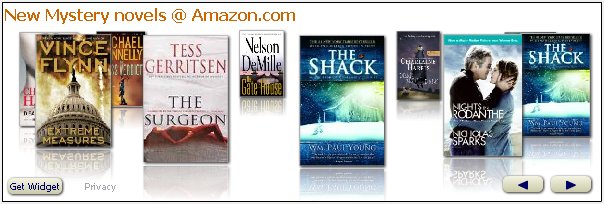
Here’s a screenshot of a Carousel widget in action.
安裝
- Upload
wp-amazon-carousel.phpto the/wp-content/plugins/directory - Activate the plugin through the ‘Plugins’ menu in WordPress
常見問題
- How do I change the size of my Carousel widget?
-
You can set ‘height’ and ‘width’ parameters to resize your widget. For e.g., to get a 400×150 widget, I would do something like this:
[carousel width=”400″ height=”150″]
Valid combinations of Width x Height are: 120×500, 160×600, 400×150, 500×175, 600×200
- What is the ‘shuffleProducts’ parameter?
-
Sometimes you want your user to see a different set of products each time the widget is rendered. Setting ‘shuffleProducts=”True”‘ ensures that the items in your Carousel are shuffled before they’re presented to the user.
- What is the ‘showBorder’ parameter?
-
If you want to add a thin border around your Carousel widget, you can set ‘showBorder=”True”‘.
- How do I create a Carousel containing products from from Amazon.co.uk?
-
Add the parameter marketplace=”GB”. Valid values for market place are: JP, FR, DE, GB, US, CA
- Where can I get all the Amazon categories?
-
To get a list of valid categories, see the ‘SearchIndex’ column on this page: http://docs.amazonwebservices.com/AWSECommerceService/2008-06-26/DG/index.html?APPNDX_SearchIndexValues.html
- Anything else I should know?
-
If you want to get real crazy, you can specify ‘browseNode=”XYZ”‘ in addition to ‘category=”ABC”‘. This allows you to search within specific categories at Amazon. For example:
[carousel list=”NewReleases” category=”Books” browseNode=”18″]
displays the latest releases from the ‘Mystery and Thrillers’ section within Books!
Similary,
[carousel keywords=”microwaves” category=”Kitchen” browseNode=”361395011″]
searches for “microwaves” within the ‘Home & Appliance’ section within the Kitchen store.
To get the list of browseNodes associates with each category, you’ll need to do a bit of snooping around with Amazon’s e-commerce APIs. Alternatively, you can drill-down into the relevant browse node at this website: http://www.browsenodes.com/node–2000.html
- One last thing. Can you tell me all the valid parameters for quick, easy reference?
-
Sure, use this table to select parameters that’ll help you customize your Carousel widget:
List of Parameters.
(I couldn’t quite figure out how to get a Table on this page so you’ll have to click on this link above to get the parameter list. Sorry 🙁 - I can’t get the widget to show up in my sidebar. Instead of the widget, I see the plugin code in the sidebar. How do I fix this?
-
WordPress doesn’t directly let you use shortcodes in the sidebar. Since this plugin uses shortcodes, you can’t add this widget to the sidebar ‘out-of-the-box’. However, there is a trivially easy 1-line fix for this! Follow these steps:
(Note: The steps below have been quoted from http://englishmike.net/2008/07/07/wordpress-quick-tips-3adding-a-shortcode-to-a-sidebar-widget/)- Login to your blog’s administration pages and go to the Theme Editor – i.e. select Design >> Theme Editor from the admin menu.
- Look in the list of Template Files on the right of the page for one called Theme Functions or functions.php and click on it to load it into the editor.
- Find a place between the tags which is not in the middle one of the functions that may already be in the file (the very top or bottom of the file are both good places) and add the following line:
add_filter(‘widget_text’, ‘do_shortcode’); - Click on the Update File button to save the modified template.
That’s all you need to do. Now any shortcodes you add to a sidebar widget will show up correctly.
- Ok, one FINAL question before I’m sold. I love the Carousel widget. Any plans on doing this for other Amazon widgets on http://widgets.amazon.com/?
-
If there’s enough interest in getting the MP3 Clips widget, Slideshow widget, My Favorites or Search widget, drop me a line at dogbertq8@gmail.com and I’ll build another plugin for those widgets.
評價
There are no reviews for this plugin.
