

描述
This is a very simple plugin to remove invalid navigation menu items in one click. When we move pages to the trash but they still display in the menu. This is so boring deleting all the invalid menu items one by one and time consuming too.
So, I have created this plugin so that WordPress users can easily remove the invalid menu items. Just install and activate the plugin then go to the menu you want to edit. You will find a button beside Save menu to remove the items. This is extremely helpful when you install theme demo content and remove the demo pages.
螢幕截圖
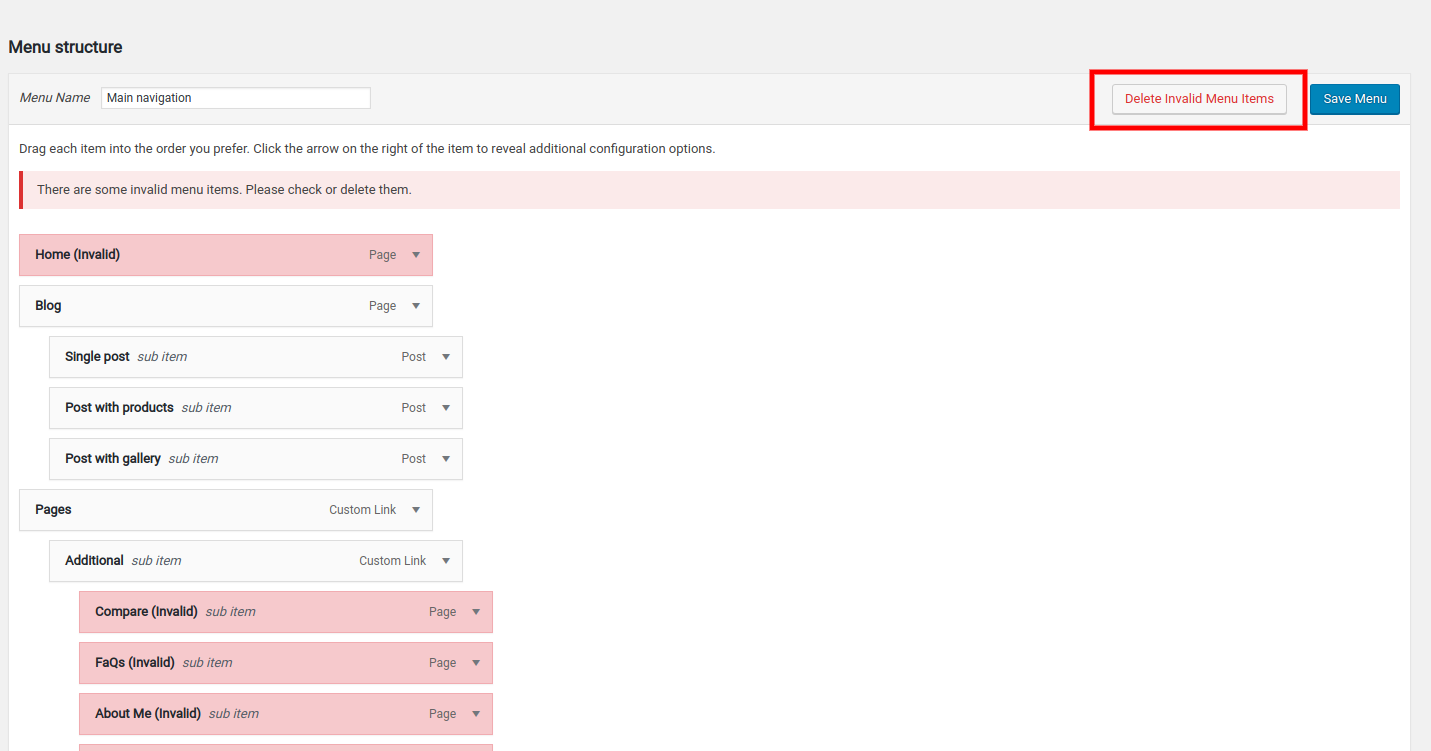
The “Delete invalid menu items” button in the menu editor
安裝
- Upload the plugin files to the
/wp-content/plugins/remove-invalid-menu-itemsdirectory, or install the plugin through the WordPress plugins screen directly. - Activate the plugin through the ‘Plugins’ screen in WordPress
- Navigate to Appearance > Menus to use the plugin
常見問題
-
How do I use this plugin?
-
After activation, go to Appearance > Menus. You’ll see a “Delete invalid menu items” button next to the “Save Menu” button. Click it to remove all invalid menu items.
-
Invalid menu items are menu entries that point to deleted pages, posts, or other content that no longer exists on your site.
-
Is this plugin safe to use?
-
Yes, the plugin only removes menu items that point to non-existent content. Your valid menu items remain untouched.
評價

貢獻者及開發者

修改日誌
1.3.1
- Fixed fatal error issue
- Improved plugin stability
- Added support for WordPress 6.8.3
1.3.0
- Bump support version to WordPress 6.0.1