
描述
Every WordPress theme and plugin loads CSS for every possible feature – menus, sliders, pop-ups, forms, even on pages that don’t use any of them. All that extra CSS slows your site down and hurts your Google PageSpeed score.
Berq Used CSS fixes this automatically.
It scans each page of your website, figures out exactly which CSS rules are actually used, and saves a trimmed-down version. From that point on, visitors get only the CSS they need – nothing more. Pages load faster, your PageSpeed score goes up, and you didn’t have to touch a single line of code. It works with every WordPress theme, page builder, and plugin – including Elementor, Divi, WooCommerce, and Gutenberg – right out of the box.
How it works:
- A visitor lands on a page for the first time – the full, original stylesheet loads normally so nothing looks broken.
- In the background, the plugin analyses the page and saves a lean version of its CSS.
- Every visitor after that gets the smaller CSS file, and the page loads noticeably faster.
Features:
- 100% free – no account, no sign-up, and no data sent to external servers
- Automatically generates used CSS for every page – no manual work required
- Processes pages quietly in the background so your site stays fast while it works
- Three stylesheet loading modes: keep originals, load them after interaction, or remove them entirely
- Exclude any URL or CSS selector you want to keep untouched
- Strip web font declarations and background images from the generated CSS to save even more weight
- Clears automatically when you save a post, update a plugin or theme, or change your design in the Customizer or Elementor
- Compatible with WP Rocket, LiteSpeed Cache, W3 Total Cache, WP Super Cache, SiteGround Optimizer, Nginx Helper, and more
- Works with every WordPress theme and plugin – no compatibility issues
- Works alongside BerqWP for a fully optimised site
螢幕截圖
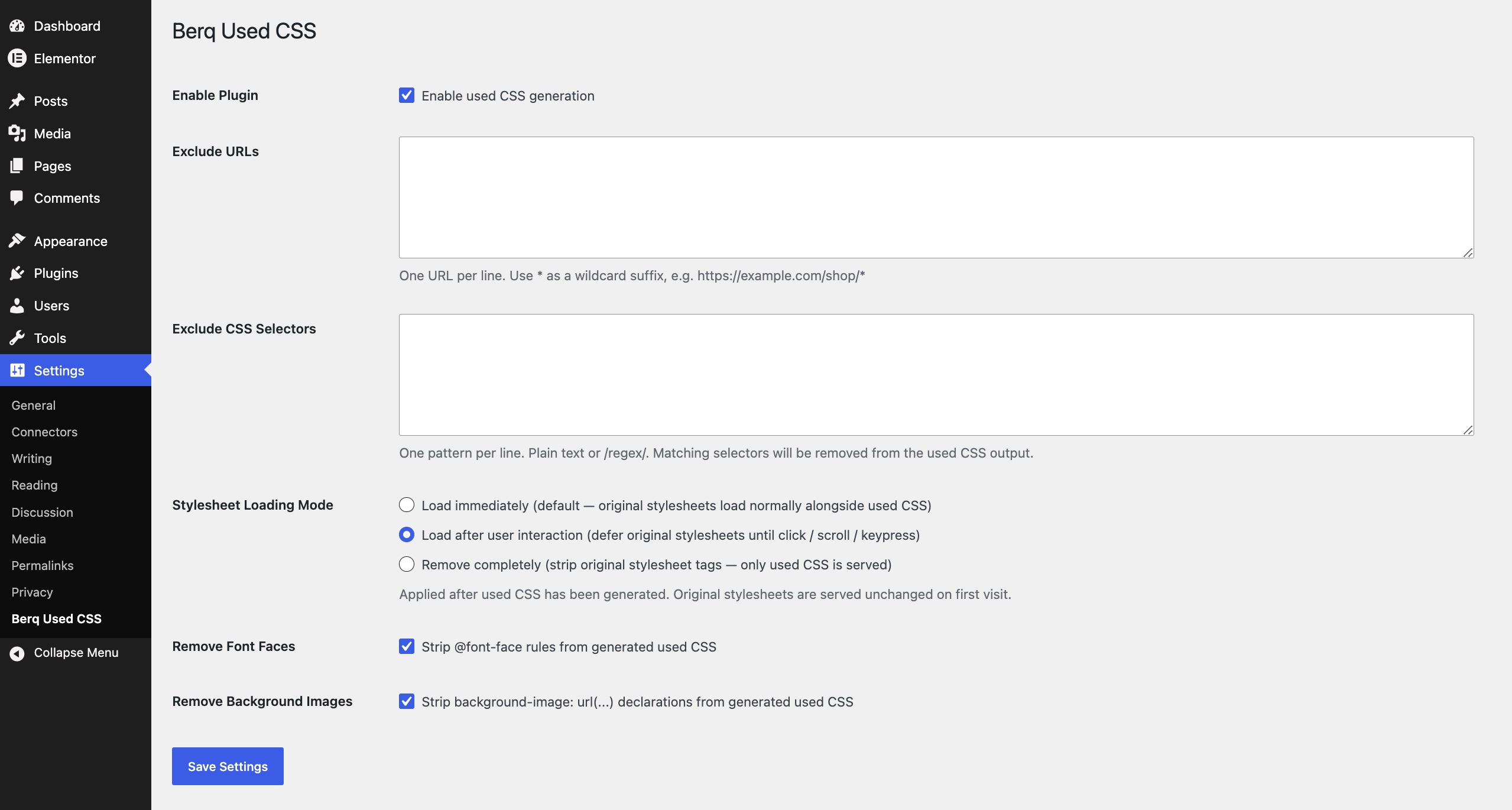
Settings page
安裝
- Upload the plugin to your site via Plugins Add New Upload Plugin, or search for “Berq Used CSS” in the plugin directory.
- Activate the plugin.
- Visit your website – used CSS will start generating automatically in the background. No configuration needed to get started.
Optional: go to Settings Berq Used CSS to choose a stylesheet loading mode, exclude specific pages, or clear the cache.
常見問題
-
Do I need to create an account or sign up for anything?
-
No. Berq Used CSS works entirely on your own website. There is no account to create, no sign-up required, and no data is sent to any external server.
-
Will this break my website’s design?
-
No. On the first visit to any page, the full original stylesheet loads exactly as before – nothing changes visually. The plugin only serves the trimmed CSS once it has finished analysing the page in the background.
-
How long does it take to generate used CSS for my pages?
-
Most pages are processed within 15–30 seconds of the first visit. The plugin works quietly in the background so your visitors never notice anything happening.
-
What happens when I update my theme or a plugin?
-
The plugin automatically clears the saved CSS and re-generates it. This happens whenever you save a post, update a theme or plugin, make changes in the Customizer, or clear cache in Elementor.
-
Which stylesheet loading mode should I choose?
-
Start with Load immediately (the default) – this already gives you a faster page by serving lean CSS. If you want the maximum speed boost, try Load after interaction, which delays the original stylesheets until the visitor scrolls or clicks. Use Remove completely only if you are confident the generated used CSS covers everything your pages need.
-
Does it work with my theme and plugins?
-
Yes – Berq Used CSS works with every WordPress theme and plugin without any configuration. It reads the CSS that your pages actually output, so it doesn’t matter whether you use Elementor, Divi, WPBakery, Gutenberg, WooCommerce, or any other tool. If your page loads in a browser, the plugin can generate used CSS for it. When you save changes in Elementor or switch themes, the saved CSS is automatically cleared and re-generated.
-
Will it affect my Google PageSpeed / Core Web Vitals score?
-
Yes – removing unused CSS directly reduces the amount of render-blocking CSS the browser has to process, which improves First Contentful Paint (FCP) and other Core Web Vitals metrics.
評價
There are no reviews for this plugin.
貢獻者及開發者


修改日誌
1.0.14
- Update readme
1.0.13
- Use wp_enqueue APIs for JS and CSS output instead of raw echo
- Escape inline CSS output via wp_strip_all_tags
- Fix unclosed output buffer – explicitly closed on shutdown
- Fix protocol-relative URL path resolution in CSS extractor
- Skip pages with query parameters from CSS generation
- Invalidate used CSS on post save, theme/plugin update, Customizer, and Elementor changes
- Add BerqWP cache compatibility hooks
- Speed up heartbeat – first beat fires in 1s, base interval reduced to 3s
1.0.12
- Update voku/simple_html_dom library version
1.0.11
- WP Repo technical improvements
1.0.0
- Initial release.
- Automatic used CSS generation in the background for every page.
- Three stylesheet loading modes: immediate, defer until interaction, remove.
- Exclude specific URLs and CSS selectors.
- Option to strip @font-face rules and background images.
- Compatible with major caching plugins and BerqWP.
- Automatic cache invalidation on post save, theme/plugin update, Customizer save, and Elementor changes.