跳至主要內容
WordPress.org

Hong Kong 香港中文

  • 佈景主題
  • 外掛
  • News
  • Support
  • About
  • 重要通知
  • WordPress 常見問題
  • 團隊
  • 取得 WordPress
取得 WordPress
WordPress.org

Plugin Directory

View User Metadata

  • Submit a plugin
  • My favorites
  • Log in
  • Submit a plugin
  • My favorites
  • Log in

View User Metadata

由Sully
下載
Live Preview
  • 詳情
  • 評價
  • 安裝
  • 開發
支援

描述

Introducing our new lightweight WordPress plugin – View User Metadata!

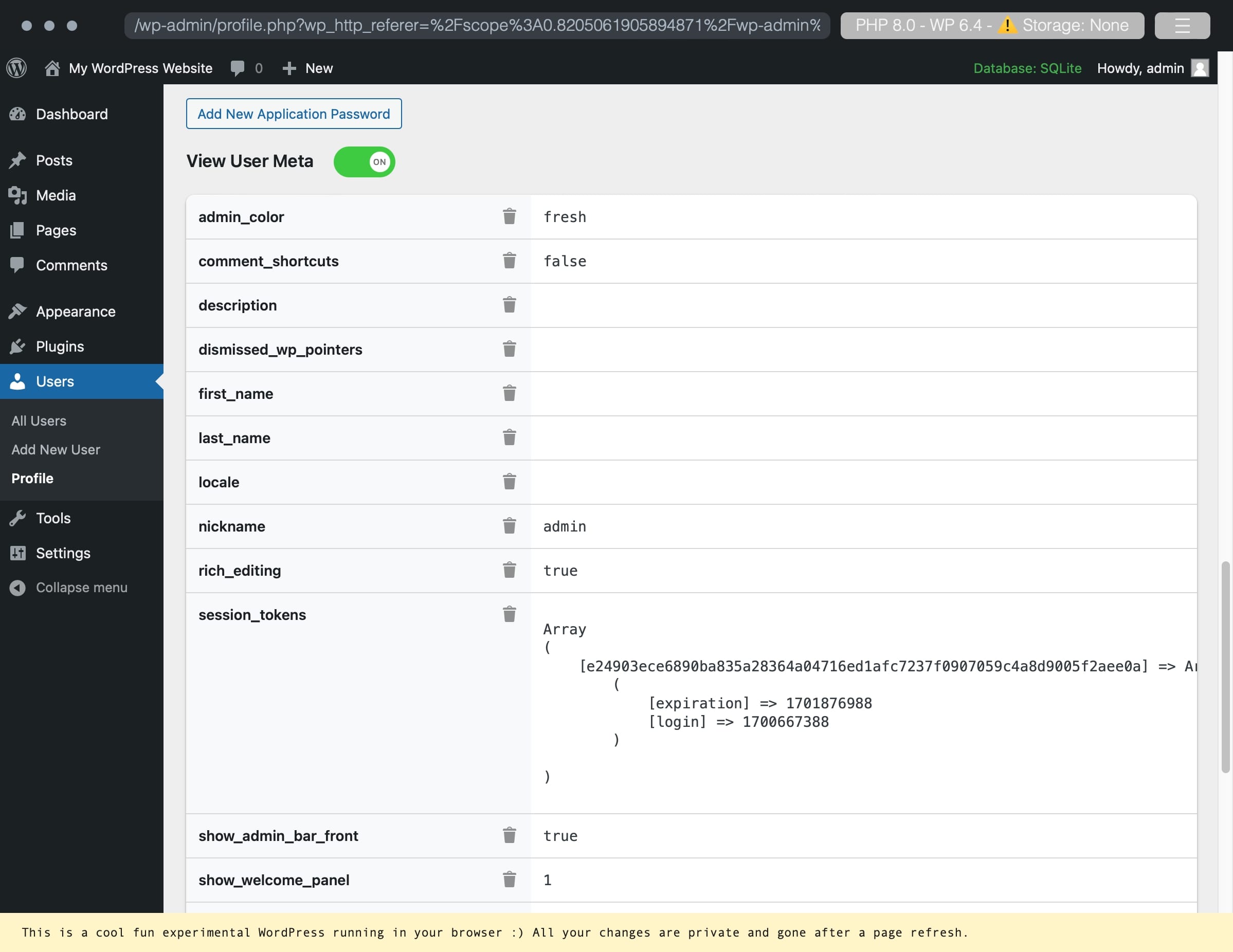
This plugin adds a simple toggle button to the user edit screen, allowing administrators to easily view metadata associated with the user they are currently viewing. Metadata includes all data attached to a user account. Administrator’s can also delete the usermeta.

This plugin is perfect for developers where metadata is important to view but doesn’t need to be displayed at all times.

Features:
– Toggle to show/hide user data
– Click-to-focus on any row
– Delete a key/value pair

Check out our other plugins:

  • 🎉 Media Library File Size
  • ✨ Export Single Post Page
  • 🔒 Two Factor (2FA) Authentication via Email
  • 🔠 Enable Turnstile (Cloudflare) for Gravity Forms
  • ⭐️⭐️⭐️⭐️⭐️ Gravity Forms to FreeScout

螢幕截圖

An example of a user account with user metadata.
Deleting a custom metadata key/value pair.
Successful deletion of a key/value pair.

安裝

Use the automatic installer via WordPress or download the plugin and:

  1. Upload the plugin files to the /wp-content/plugins/view-user-metadata directory.
  2. Activate the plugin through the ‘Plugins’ screen in WordPress.
  3. Navigate to your profile or any other users and enable the toggle for View User Metadata.

評價

Wow!

johndeebdd 2024年5月24日 1 reply
Several things about this plugin: 1) It just works the way it’s supposed to. 2) It doesn’t have any B.S. bloatware, ads, popups etc. 3) What it does have, that I haven’t seen before, is a string change in the plugins.php that creates a link “Need help?” link to an external link. Couple things about that: It’s extremely non-obtrusive, and not-annoying. In fact, it’s right where it’s supposed to be. If you’re looking at that line in the screen, you probably need help with that plugin. It’s real estate the plugin owns. HOWEVER, the user has to see it every time they look at plugins.php. That’s a great idea from a plugin developer pov. It’s unobtrusive, and you HAVE to see it all the time. Anyway, I’m stealing that idea. Oh, the plugin is great too! 🙂
閱讀全部1個評價

貢獻者及開發者

“View User Metadata” 是一個開源的軟體。以下的人對這個外掛作出了貢獻。

貢獻者
  • Sully

將 View User Metadata 外掛本地化為台灣繁體中文版。

對開發相關資訊感興趣?

任何人均可瀏覽程式碼、查看 SVN 存放庫,或透過 RSS 訂閱開發記錄。

修改日誌

1.2.2

  • Security fixes
  • NEW: Export to CSV or JSON
  • NEW: Common sensitive keys are now protected by a Lock by default. To delete them, click the Lock to Unlock the key/value pair.

1.2.1

  • Delete button fix (pressing enter would trigger the first button)
  • Localization JS fix
  • Added ability to click-to-focus helping focus on a specific row

1.2

  • Localization support

1.11

  • Move delete icon to work across screen sizes

1.1

  • Ability to delete the meta key and value pair.

1.0

  • Initial release.

其它

  • Version 1.2.2
  • Last updated 6 個月之前
  • Active installations 1,000+
  • WordPress version 4.6 or higher
  • Tested up to 6.9.7
  • PHP version 5.6 or higher
  • Language
    English (US)
  • Tags
    user metauser metadata
  • 進階顯示

評分

5 out of 5 stars.
  • 1 5-star review 5 stars 1
  • 0 4-star reviews 4 stars 0
  • 0 3-star reviews 3 stars 0
  • 0 2-star reviews 2 stars 0
  • 0 1-star reviews 1 star 0

Your review

See all reviews

貢獻者

  • Sully

支援

有話想說?需要協助?

檢視支援論壇

捐贈

想要支援這個外掛的發展嗎?

贊助這個外掛

  • 關於我們
  • 最新消息
  • 寄存
  • 隱私權
  • 展示網站
  • 佈景主題
  • 外掛
  • 區塊版面配置
  • Learn
  • 技術支援
  • 開發者資源
  • WordPress.tv ↗
  • 共同參與
  • Events
  • Donate ↗
  • Swag ↗
  • WordPress.com ↗
  • Matt ↗
  • bbPress ↗
  • BuddyPress ↗
WordPress.org
WordPress.org

Hong Kong 香港中文

  • Visit our X (formerly Twitter) account
  • Visit our Bluesky account
  • Visit our Mastodon account
  • Visit our Threads account
  • 訪問我們的 Facebook 專頁
  • Visit our Instagram account
  • Visit our LinkedIn account
  • Visit our TikTok account
  • Visit our YouTube channel
  • Visit our Tumblr account
代碼就是詩歌。
The WordPress® trademark is the intellectual property of the WordPress Foundation.