
描述
Easily search and replace any text, links, and images inside the Elementor editor with Search & Replace for Elementor.
One of the most popular visual editors, Elementor, lacks a search and replace feature.
With Search & Replace for Elementor, you can now easily replace any text, links and images without the need to install any additional software to your computer.
USAGE
Once you upload and activate the plugin.
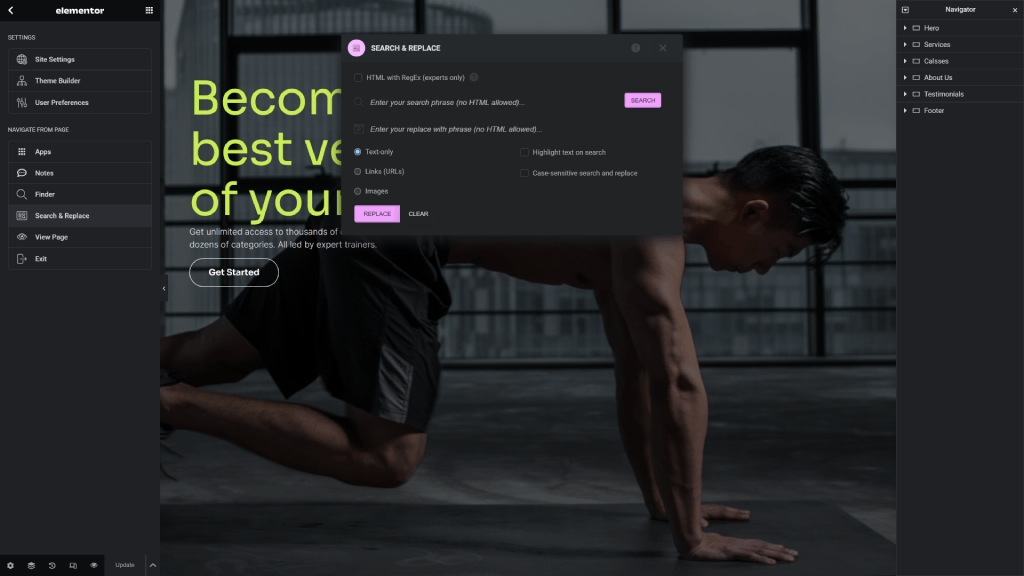
Go to any Elementor created page and navigate to Menu > Search & Replace to open the plugin modal window.
From the options you can choose to highlight or do a case-sensitive search and replace.
In the Search & Replace for Elementor add special tags to highlight the text, and you can always click on the Clear button if you want to clean your code.
Here are the general steps you need to follow to use the plugin:
- Open the plugin modal window.
- Choose if you want to
highlightterms or do acase-sensitivesearch and replace. - Enter you search phrase and click on the
Searchbutton. - Enter your replace with phrase.
- Click on the
Replacebutton. - Use the
Undolink to revert back to the original text. - Click on the
Clearbutton to if you want to clean your code from the special highlight tags at any give time.
NOTE: To assure and not compromise the performance of the plugin we have set a raw data limit at 300kb.
FEATURES & LIMITATIONS
Search & Replace for Elementor is/does:
- a plugin to the popular Elementor visual editor that enables you to search and replace any text/link/image in your posts and pages quickly and easily.
- enhances your efficiency in Elementor, allowing you to edit your posts and pages with much faster pace than usual, on page-by-page basis or in bulk/mass.
- a plugin designed to look native and works seamlessly with both Elementor Free and Pro versions.
- a WordPress plugin for Elementor that enables you to update multiple text terms, phrases, images, and/or links with highlighting and case-sensitivity inside the visual editor.
- perfect for heavy Elementor users that want to speed up their editing process.
NOTE: Bulk search and replace with Links (URLs), Images, and Case-sensitive filters, as well as Backups and Custom Options features are available only in the PRO version!
DETAILED DOCUMENTATION
The step-by-step setup, usage, demos, video, and insights can be found on the Search & Replace for Elementor Pro website.
SEARCH AND REPLACE FOR ELEMENTOR PRO
If you are using the Free version of the plugin from the WordPress.org repository and would like to have the Pro features you can purchase the premium version from the Search & Replace for Elementor Pro website.
Some of the features included in the Search & Replace for Elementor Pro version of the plugin are:
- Bulk search and replace with dry-run option.
- Bulk and inidividual page search and replace with regular expressions.
- Built-in backup and database import feature.
- Additional options that can help you to customize you search and replace data fields.
- Custom options to change raw page data and do partial URL search & replace.
- Priority support and regular updates for one year.
螢幕截圖
screenshot-1.(png) 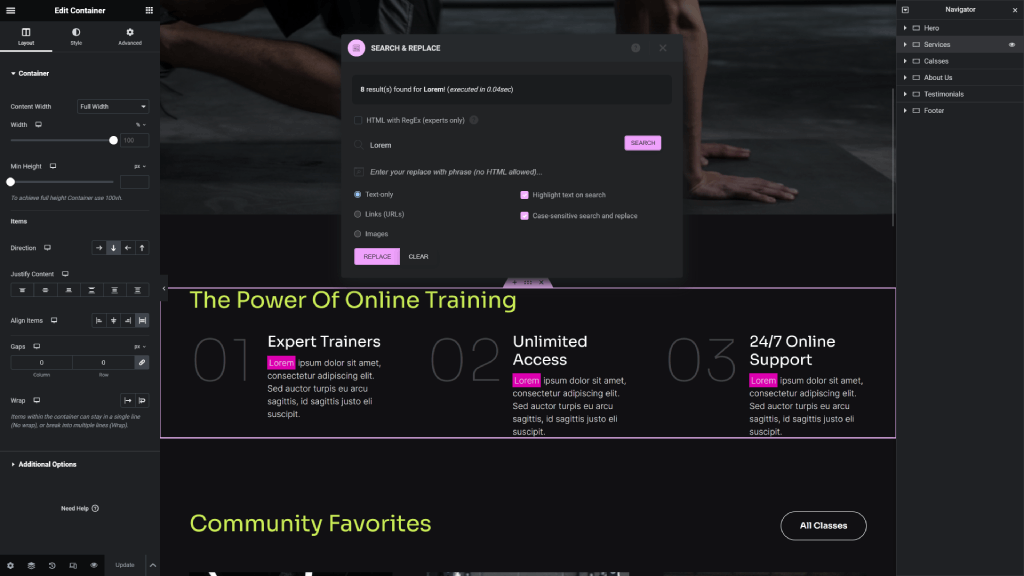
screenshot-2.(png) 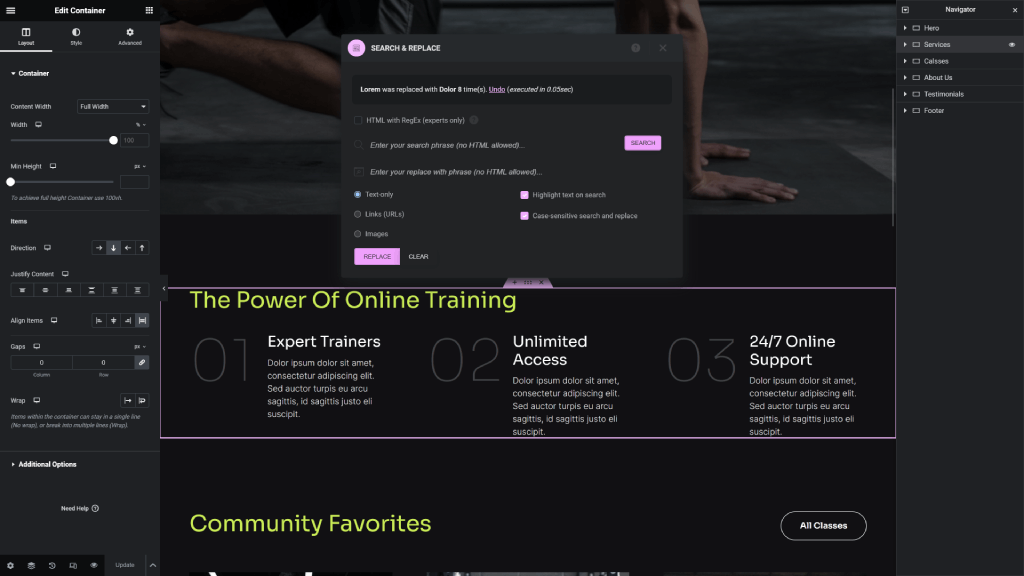
screenshot-3.(png)
安裝
The installation process for the plugin is standard and user-friendly. Please inform us if you face any challenges throughout the installation.
Installation from WordPress
- Visit Plugins > Add New.
- Search for Search & Replace for Elementor.
- Install and activate the Search & Replace for Elementor plugin.
Manual Installation
- Upload the contents of the entire
search-replace-for-elementorfolder to the/wp-content/plugins/directory. - Visit Plugins.
- Activate the Search & Replace for Elementor plugin. Make sure to have the Elementor Free or Pro versions activated before that.
After Activation
- Now you can go to any page/post that uses Elementor and use the plugin as described in the documentation.
常見問題
Use the Support tab on this page to post your additional requests and questions.
All tickets are usually addressed within a couple of days.
If your request is an add-on feature, we will add it to the plugin wish list and consider implementing it in the next major version.
-
Will this plugin work with the free Elementor version?
-
Yes, the plugin works with both Elementor Free and Pro versions.
-
Does it work with the Classic/Gutenberg editors?
-
No. The plugin is specifically created to work with the Elementor plugin and its custom way of data storage.
However, if you are interested you can try out our open source Block Editor Search & Replace plugin which works with both the Classic and Gutenberg editors.
-
Do you offer additional support/customization?
-
Yes, you can get in touch with us by sending us your request on the Search & Replace for Elementor Pro website.
評價


貢獻者及開發者


修改日誌
1.3.8
- Update – Compatibility check with Elementor 3.21
- Update – Remove promo code which was disabled temporary
1.3.7
- Fix – Fix upgrade notice to show every 30 days.
1.3.6
- New – Add the ability to search/replace link in the editor in text-only mode
- Update – WordPress 6.5 compatibility check
- Fix – Use
strip_tagswithwp_strip_all_tagsneed to have the PHP function to allow tags - Fix – Remove the
WFL_and replace withELEMSNR_
1.3.5
- Fix – Replace all
json_encodewithwp_json_encode, and be sure thejson_decodereturns an array with 2nd argtrue - Fix – Add
wp_noncefor rating, upgrade notices and nav links - Fix – Used
esc_html,esc_url,wp_ksesetc. to escape all missed strings - Fix – Use
wp_strip_all_tagsforstrip_tags
1.3.4
- New – Add upgrade notice with transient and dissmis nd success button
- Update – Add UTM for plugin website links
1.3.3
- Update – Remove
$from common in JS an usejQuerywhere needed - Update – Replace 2023 from copyright to 2024
- Update – Tested compatibility with Elementor 3.20
1.3.2
- Update – Remove
strip_html_tagsnot needed anymore, causing some UTF8 issues - Update – Use
strip_tagsPHP built-in forstrip_tags_with_whitespace - Update – By default
<a/>href wihtineditorandtextdata fields can be searched inText-onlymode, won’t show in URLs - Fix – Add
umodified topreg_replaceso we can handle UTF8 charactes for langs like Greek, Bulgarian, Chinese etc - Fix – Check if we have Elementor Pro since
_css_classesisn’t allowed in the free version - Fix – Add the 2nd param for
search_and_replacefunction where it was missing
1.3.1
- Update – Tested compatibility with Elementor 3.19
- Fix – Make a fix to the
merge_into_iteratorfor thesearch_and_replacefunction
1.3.0
- Fix – Add missing files & folder to the SVN repo
1.2.9
- New – Add Images and URLs highlight custom class for searches
- New – Add runtime and execution time for each action in the Elementor editor
- New – Move all
elemsnr_ajax functions intoelementor-actions.php - Update – Remove admin user cap from
settings-menu.php - Update – Update development and workflow files to match the Pro
- Fix – Preserve letter case when we use the text highlighter
- Fix – Fully test and fix the undo function for all search types
1.2.8
- Update – Break the requirements and settings into components
- Update – Break the SASS into componenets and fixed some small CSS issues
- Update – Refactor and optmize JS code, for the admin functions
1.2.7
- Update – Split larger SASS files into smaller once for better maintenance
- Update – Add global error message in the main JS file
- Update – Move all admin php function it their own class
1.2.6
- New – Add PRO version table for promo
- Update – Fully tested compatibility with Elementor 3.18
- Update – Add
manage_optionsto the main page
1.2.5
- Update – Update search and replace modal fields order for better UX
- Update – Namespace, comments, and minor styling and naming changes
- Fix – Activate/deactivate functions and the notice option issues
1.2.4
- Update – Disable Replace button on single post/page by default and enable only when results found
1.2.3
- Update – Add error funcions on all ajax calls with internal error message
- Fix – Fix links and images not working, use
strip_tagsfunction
1.2.2
- Fix – Skip all data fields with arrays, support 3rd-party plugins like ElementsKit
- Fix – Remove attributes code for
strip_html_tags()custom function
1.2.1
- New – Add support for Editor Top Bar feature for single pages
- Update – Fully tested compatibility with WordPress 6.4
- Update – Fully tested compatibility with Elementor 3.17
- Update – Fully tested compatibility with PHP 8.1
1.2.0
- New – Search & replace links in
text_onlyfilter, and accept<p><a><elsnr-highlight>tags - New – Add custom
strip_html_tagsfunction with attrs similar to PHPstrip_tags - Update – Check highlight text on search as default
- Update – Remove
editorfromELEMSNR_URL_FIELD_KEYS_ARR - Fix – Load admin styles for all admin pages
- Fix – Clean
<elsnr-highlight>and</elsnr-highlight>as well - Fix – Rating link URL
- Fix – Settings fields keys loading in constructor
1.1.9
- New – Search and replace for Links (URLs) and Images on single pages
- New – Enable case-sensitive search and replace for single pages
- Fix – Minor class and style fixes
1.1.8
- Update – Change the global wording with bulk or mass keyword
- Update – Minor styles and formatting changes
- Update – Compatibility and testing with the latest Elementor release
1.1.7
- Update – Remove global search and replace demo and add demo YouTube video
1.1.6
- Update – Minor updates and testing with new WordPress release
1.1.5
- Update – Minor updates and testing with new WordPress release
1.1.4
- Update – Minor updates and testing with new WordPress release
1.1.3
- New – Add
array_keys_existto check multiple array keys against an array - Fix – Revisit the update original elementor data with the iterator process
1.1.2
- Update – Minor updates and testing with new WordPress release
1.1.1
- Update – Add nonce and user capability security checks for all ajax methods
- Update – Revise UI help notes, error and success messages
- Fix – Search and replace for fields in the same widget e.g. text & description in Icon widget
- Fix – Remove some existing
console.log()dev lines
1.1.0
- New – Add HTML with regular expressions for Text Editor widget (modal-only)
- New – Add
preg_last_error_msgto work same way as PHP8 - Update – Match the Elementor updated UI in 3.12 for modal window
- Fix – Remove dev/prod loading assets; not needed anymore
- Fix – Auto deactivate Pro if already active
1.0.9
- Update – Add new translator messages
- Update – Language file with the latest strings
- Update – Run code with WPCS and
WordPress-Core
1.0.8
- Update – Add global search and replace demo page
1.0.7
- Update – WordPress 6.2 compatibility and testing
1.0.6
- Fix – No matches found when have punctuations in the search or replace input
- Update – Add text to let user that
no HTML is allowedin the inputs - Update – Add text to let use know the need to backup DB when do global search & replace
1.0.5
- Fix – Add glupfile.js script building procedure
- Fix – Handle null or string elementor data passed to the iterrator
1.0.4
- Fix – Replace
strip_tags()withstrip_tags_with_whitespace()
1.0.3
- New – Add rating admin notice
- New – Add plugin
Go Prolink under plugins - Update – Language file with the latest strings
- Update – Add translation string
1.0.2
- Fix – Able to search and replace I’m, you’re “quote text”, etc
1.0.1
- Fix – Elementor JSON data breaks with
update_postmeta(), fix withwp_slash()
1.0.0
- Initial release and first commit into the WordPress.org SVN