

描述
Pinny’s Multi Admin lets you add multiple admin email recipients to WordPress notifications so your entire team receives important site alerts.
By default, WordPress only sends administrative notifications to the single email address configured in Settings General. This plugin simply extends WordPress’ native notification system and adds additional recipients.
With this lightweight plugin you can add as many additional admin email addresses as you want. All of these emails will receive:
- New user registration notifications
- Password change alerts
- Core update notifications
- Plugin and theme automatic update reports
- Fatal error recovery mode emails
- Other administrative alerts generated by WordPress
Perfect for agencies, development teams, site owners, and anyone who wants multiple people to receive critical WordPress notifications.
Plugin Size: Ultra lightweight — only 1.5KB!
Common Use Cases
Agencies
Receive important WordPress notifications across your entire team instead of relying on a single admin email.
Development Teams
Ensure developers, project managers, and site owners all receive plugin updates, core update notices, and critical error alerts.
Site Owners
Add a backup email so important alerts like password changes, security notices, or recovery mode emails never go unnoticed.
Client Websites
Send WordPress admin notifications to both the developer and the client for full transparency.
Features:
- Add unlimited additional admin email recipients
- Appears directly in Settings General
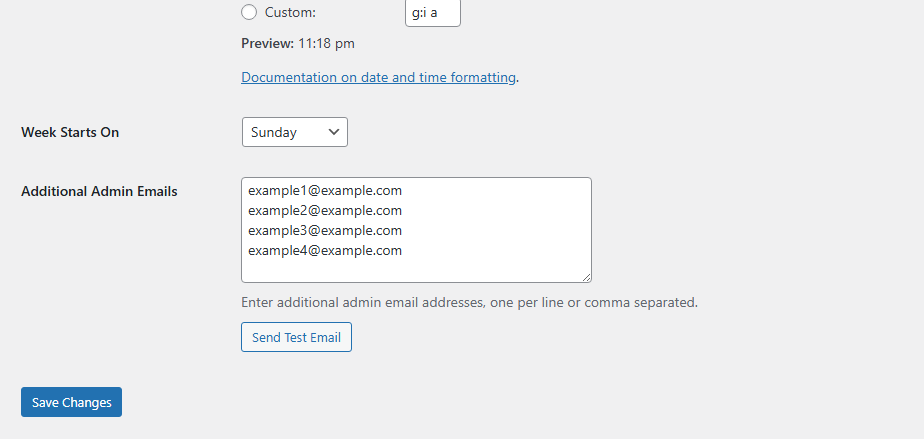
- Supports comma-separated or one-per-line email input
- Automatic email validation and deduplication
- Extends WordPress’ native notification emails
- Ultra lightweight — ~1.5 KB zipped
- Clean uninstall
Ultra Lightweight
Pinny’s Multi Admins is intentionally minimal.
There are:
- No dashboards
- No JavaScript
- No CSS
- No tracking
- No telemetry
- No performance impact
Plugin size: ~1.5 KB zipped
螢幕截圖
安裝
- Upload the
pinnys-multi-adminsfolder to the/wp-content/plugins/directory - Activate the plugin through the ‘Plugins’ menu in WordPress
- Go to Settings General
- Scroll down below the default “Administration Email Address”
- Add your extra admin emails (one per line or comma-separated)
常見問題
-
Does this replace the default admin email?
-
No. The original admin email always stays in the list. This plugin only adds extra recipients.
-
Will this slow down my site?
-
Not at all. The plugin only runs when WordPress actually sends an admin email.
-
Can I use it with Pinnys Simple SMTP or other mailer plugins?
-
Yes! It uses the standard
wp_mail()function, so any SMTP plugin works perfectly.
評價
There are no reviews for this plugin.
貢獻者及開發者

修改日誌
1.1.0
- Refactored the plugin to use WordPress’ native notification emails instead of sending custom ones.
- Removed the built-in test email feature and related JavaScript.
- Simplified the plugin code and reduced overall size.
1.0.1
- Fixed plugin tag issues.
- Removed an extra space character in the test email message.
1.0.0
- Initial release — full support for all major WordPress admin notifications