描述
Social Media – Accounts, Profiles
Show Facebook, Twitter, Google Plus, Instagram, Youtube, Pinterest, Vine, Vimeo, Digg, Tumblr, Flickr, RSS Feed Link, Email, WordPress, Snapchat, Wechat, QQ, StackOverflow profiles with profile link with font awesome icons.
Display your social icons using Social Media Widget, Who based on Irresistible CSS & JS, So it is very amazing, responsive and easy to use.
Show social media, social icon, social profiles, media, social application, social widget, Facebook, Twitter, Google Plus, Instagram, Youtube, Pinterest, Vine, Vimeo, Digg, Tumblr, Flickr, RSS Feed Link, Email, WordPress, Snapchat, Wechat, QQ, StackOverflow profiles with profile link with font awesome icons.
Get More Ultimate Features – Click Here
The Social Media Widget takes a simple, extendible approach to displaying links to your social media profiles in WordPress.
The purpose of this plugin was to strip away the complexities, most other plugins to have and simply display a set of basic social icons in a list, There are no-frills and no fanciness, making it easy to style to your website’s look, It does not require any other optimization
social media plugin to display your profiles using Social Media Widget plugin.
Social Media Plugin with many Social Media Icons and Settings Like Size, Icon Styles, Responsive Configuration, Rotate Effects, Social Media Widget, Icon Animation, Highly Customizable
How To Use Social Media Widget
Upgrade To Premium Plugin – Click Here
Check Premium Plugin Demo – Click Here
Features
SOCIAL MEDIA
Social Media Icons Are Use to Subscription On Your Sites.
CUSTOMIZATION
You Can Customize Profile settings And Widget Settings For Social Media Icons
TRANSFORM EFFECT
You Can Set Transform Effect To Rotate Icons In Different Directions
Transform (90°)
Tranform (180°)
Tranform (270°)
Tranform (360°)
Tranform (90° X-Direction)
Tranform (180° X-Direction)
Tranform (270° X-Direction)
Tranform (360° X-Direction)
Tranform (90° Y-Direction)
Tranform (180° Y-Direction)
Tranform (270° Y-Direction)
Tranform (360° Y-Direction)
HOVER EFFECT
When You Hover At Any Social Media Icon Hover Effect Will Be Apply On Icon
COLOR PICKER
You Can Set Colors For Icon , Icon Background , Icon On hover , Icon On Transform By Color Picker
MANAGE SPACING
You can manage the spacing betwwen the share icon easely.
CUSTOM CSS
Custom CSS Feild Use For Apply Your Own Settings On Social Media Icons By Using Textarea
SOCIAL MEDIA PRO FEATURES AND DEMO
Demo for Lite and Pro Version
Recommended Plugins
The following are other recommended plugins by the author:
- Portfolio Filter Gallery – The Gallery Plugin to create awesome Portfolio Filter Gallery Plugin in minutes.
Buy Premium Plugin – Click Here
- Media Slider – The Media Slider Plugin to create Media / Video Slider Gallery Plugin in minutes.
Buy Premium Plugin – Click Here
- Best Weather Effect Plugin – Very Simple And Easy To Design Your Sites With Multiple Effects.
Buy Premium Plugin – Click Here
- Best Grid Gallery Plugin – Easy Grid Gallery Widget – Displaying your image in Page & Post widget/sidebar area with very easy.Allows you to customize it to looking exactly what you want.
Buy Premium Plugin – Click Here
- Image Gallery Plugin – Gallery Lightbox – Displays all gallery images into the lightbox slider in just a few seconds.
Buy Premium Plugin – Click Here
- Photo Gallery Plugin – Displays all Photo Gallery, Video Gallery, Link Gallery, Map Gallery into WordPress in just a few seconds.
Buy Premium Plugin – Click Here
- Slider Plugin – Fully Responsive Slider Gallery For WordPress ,You can Show Slider Into Page/Post & Widget/Sidebar By Generate Shortcode.
Buy Premium Plugin – Click Here
- Contact Form – Contact Form Widget Shortcode Plugin For WordPress.
Buy Premium Plugin – Click Here
- Social Media Plugin – Display your Social Media Plugin into Widget/Sidebar in WordPress site with very easily.
Buy Premium Plugin – Click Here
- Best Responsive Slider Plugin – Fully Responsive Light Weight Easy Powerful WordPress Slider Slideshow Plugin.
Buy Premium Plugin – Click Here
- Video Gallery Plugin – The Best Responsive video gallery For WordPress.
Buy Premium Plugin – Click Here
-
Facebook Like Share Follow Button – Display your Facebook Like Share Follow Button Plugin into Page/Post & Widget/Sidebar in WordPress sites with very easily.
-
Google Plus Badge – Google+ Badge & Profile Widget For Show Into Widget & sidebar
-
Facebook Likebox Plugin – Facebook Light Box Plugin For WordPress
螢幕截圖
Social Settings 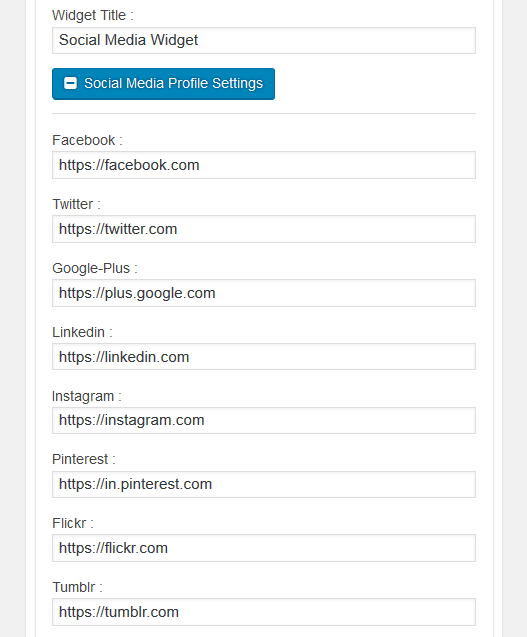
Social Profile Settings 
Widget Design & Effect Settings
安裝
Install Social Media either via the WordPress.org plugin directory, or by uploading the files to your server.
After activating New Social Media Widget plugin, go to plugin menu.
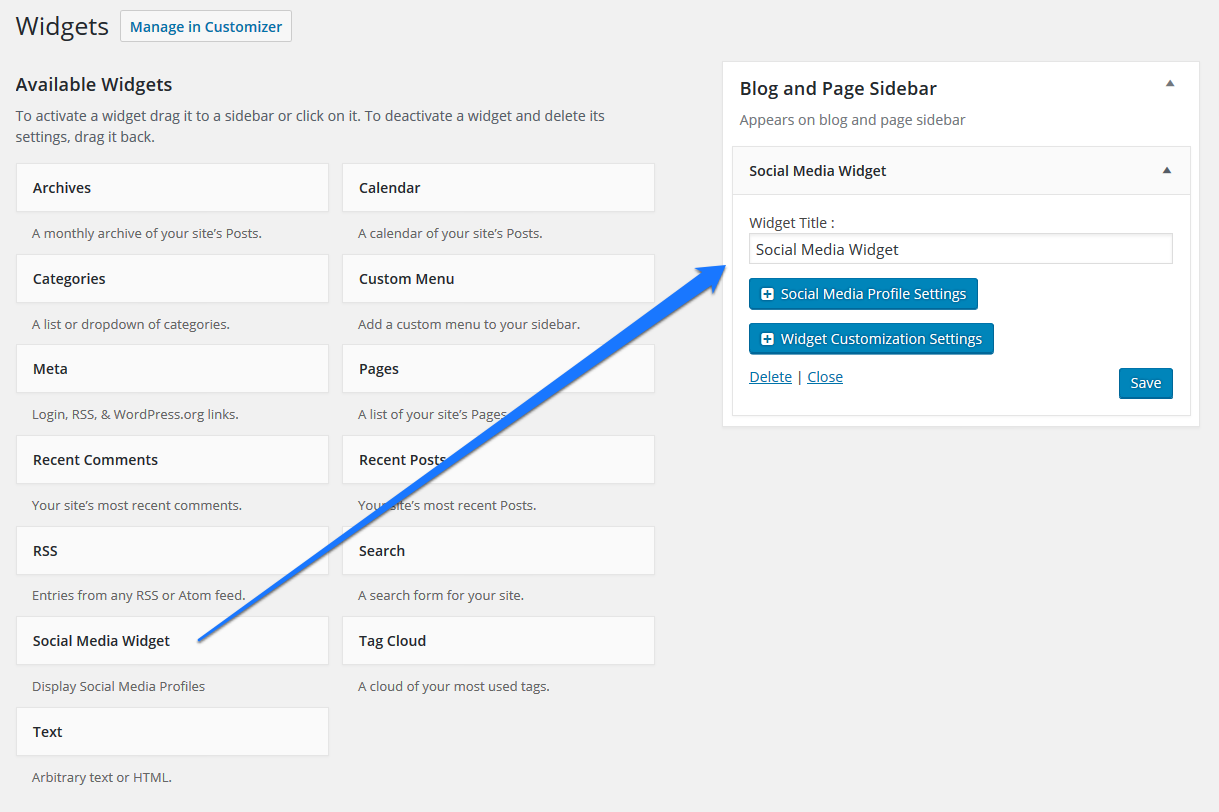
Login into admin dashboard. Go to Appearance –> Widgets : Social Media Widget
Activate the New Social Media Widget into widget area fo theme.
Configure settings and save.
That’s it. You’re ready to go!
Standard Features
- 12 Social Media Icons
- Social Media Icon Color Settings
- Social Media Profile Links
- Icons Color
- Widget for Sidebar
- Widget for footer
- Icons Background Color
- Multiple Icons Into Per Row
- Custom CSS
Premium Features
- 30+ Social Media Profiles
- Social Media Profile Links
- Social Icon Color Settings
- Two Effect Types
- 10+ Transform Effects
- 60+ Hover Effects
- Unlimited Color
- Hover Color Settings
- Multiple Icon Sizes
- Color Picker
- Widget for Sidebar
- Widget for footer
- Multiple Icon Into Per Row
- Full Widget Customization
- Custom CSS
常見問題
Have any queries?
Please post your question on plguin support forum
https://wordpress.org/support/plugin/new-social-media-widget/
評價


貢獻者及開發者
“Social Media Icons – Social Icons Widget” 是一個開源的軟體。以下的人對這個外掛作出了貢獻。
貢獻者


修改日誌
= 1.2.2=
* Tested Upto New version 6.4.2
= 1.2.1=
* Updated Icon Library.
* Updated twitter icon to X.
* Tested Upto New version 6.4.2
= 1.2.0=
* Tested Upto New version 6.4.2
1.1.22
- Enhancements: Tested Upto New version 6.3.2
1.1.21
- Enhancements: Tested Upto New version 6.3.1
1.1.20
- Bug Fix: Fixed,
- Enhancements: Tested Upto New version 6.2.1
1.1.19
- Enhancements: Tested Upto New version 6.1.1
1.1.18
- WordPress security issues fixed.
- Enhancements: Tested Upto New version 6.0.1
1.1.17
- Enhancements: Tested Upto New version 6.0.1
1.1.16
- Enhancements: Tested Upto New version 5.9.3
1.1.15
- Enhancements: Tested Upto New version 5.9
1.1.14
- Enhancements: Tested Upto New version 5.8.2
- Bug Fix: Fixed,
- Enhancements: Default Bootstrap v3.3.6 Added
1.1.13
- Enhancements: Tested Upto New version 5.8.2
- Bug Fix: Fixed,
- Enhancements: New Bootstrap Library added v5.1.3
1.1.12
- Enhancements: Tested Upto New version 5.8.1
1.1.11
- Enhancements: Tested Upto New version 5.7.2
1.1.10
- Enhancements: Tested Upto New version 5.7.1
1.1.9
- Enhancements: Tested Upto New version 5.7
1.1.8
- Enhancements: Tested Upto New version 5.6.2
1.1.7
- Enhancements: Tested Upto New version 5.5.3
- Bug Fix: Fixed,
1.1.6
- Enhancements: Tested Upto New version 5.5.3
1.1.5
- Enhancements: Tested Upto New version 5.5.1
1.1.4
- Enhancements: Tested Upto New version 5.5
1.1.3
- Enhancements: Tested Upto New version 5.4.2
1.1.2
- Enhancements: Tested Upto New version 5.4.1
1.1.1
- Enhancements: Tested Upto New version 5.3.2
1.1.0
- Enhancements: Tested Upto New version 5.3.2
1.0.12
- Enhancements: Tested Upto New version 5.2.3
1.0.11
Css Bug Fixed
Version 1.0.10
- Enhancements: Tested Upto New version 5.2.2
- Bug Fix: Fixed,
- Additional changes: banner image and icon changed,
Version 1.0.9
- Enhancements: Tested Upto New version 5.2.2
- Bug Fix: Fixed,
- Additional changes: banner image and icon changed,
Version 1.0.8
- Enhancements: Tested Upto New version 5.2.2
- Bug Fix: Fixed,
- Additional changes: None,
Version 1.0.7
- Enhancements: Tested Upto New version 5.2.2
- Bug Fix: Fixed,
- Additional changes: None,
Version 1.0.5
- Enhancements: Tested Upto New version 5.2.1
- Bug Fix: Fixed,
- Additional changes: None,
Version 1.0.4
- Enhancements: Tested Upto New version 5.2.1
- Bug Fix: Fixed,
- Additional changes: None,
Version 1.0.3
- Enhancements: Tested Upto New version 5.1.1
- Bug Fix: Fixed,
- Additional changes: None,
Version 1.0.2
- Enhancements: Tested Upto New version 5.1.1
- Bug Fix: Fixed,
- Additional changes: None,
Version 1.0.1
- Enhancements: Tested Upto New version 5.1
- Bug Fix: Fixed,
- Additional changes: None,
Version 1.0.0
- Enhancements: Tested Upto New version 5.0.3
- Bug Fix: Fixed,
- Additional changes: None,
Version 0.3.5
- Enhancements: Tested Upto New version 5.0.3
- Bug Fix: Fixed,
- Additional changes: None,
Version 0.3.4
- Enhancements: Tested Upto New version 5.0.2
- Bug Fix: Fixed,
- Additional changes: None,
Version 0.3.3
- Enhancements: Tested Upto New version 5.0.2
- Bug Fix: none,
- Additional changes: None,
Version 0.3.2
- Enhancements: Tested Upto New version 5.0.1
- Bug Fix: none,
- Additional changes: None,
Version 0.3.1
- Enhancements: No.
- Bug Fix: none,
- Additional changes: update link,
Version 0.3.0
- Enhancements: Yes, Hindi translation file added.
- Bug Fix: none,
- Additional changes: None,
Feature Enhancements: Version 0.2.19
* Enhancements: None
* Bug Fix: typos fix
* Additional changes: plugin is translation ready
Feature Enhancements: Version 0.2.18
* Enhancements: None
* Bug Fix: Fixed
* Additional changes: None
Feature Enhancements: Version 0.2.16
* Enhancements: None
* Bug Fix: None
* Additional changes: None
Feature Enhancements: Version 0.2.15
* Enhancements: Tested Upto New version 4.8.1
* Bug Fix: None
* Additional changes: None
Feature Enhancements: Version 0.2.14
* Enhancements: compatible upto new version 4.8
* Bug Fix: None
* Additional changes: None
Feature Enhancements: Version 0.2.13
* Enhancements: compatible upto new version 4.8
* Bug Fix: None
* Additional changes: None
Feature Enhancements: Version 0.2.12
* Enhancements: compatible upto new version 4.8
* Bug Fix: None
* Additional changes: None
Feature Enhancements: Version 0.2.11
* Enhancements: None
* Bug Fix: None
* Additional changes: None
Feature Enhancements: Version 0.2.10
* Enhancements: None
* Bug Fix: None
* Additional changes: None
Feature Enhancements: Version 0.2.9
* Enhancements: None
* Bug Fix: None
* Additional changes: None
Feature Enhancements: Version 0.2.8
* Enhancements: None
* Bug Fix: None
* Additional changes: None
Feature Enhancements: Version 0.2.7
* Enhancements: None
* Bug Fix: None
* Additional changes: None
Feature Enhancements: Version 0.2.6
* Enhancements: None
* Bug Fix: None
* Additional changes: None
Feature Enhancements: Version 0.2.5
* Enhancements: None
* Bug Fix: None
* Additional changes: None
Feature Enhancements: Version 0.2.4
* Enhancements: None
* Bug Fix: None
* Additional changes: None
Feature Enhancements: Version 0.2.3
* Enhancements: None
* Bug Fix: Changes Into Padding setting
* Additional changes: None
Feature Enhancements: Version 0.2.2
* Enhancements: None
* Bug Fix: None
* Additional changes: None
Feature Enhancements: Version 0.2.1
* Enhancements: None
* Bug Fix: None
* Additional changes: None
Feature Enhancements: Version 0.2.0
* Enhancements: None
* Bug Fix: None
* Additional changes: None
Feature Enhancements: Version 0.1.9
* Enhancements: None
* Bug Fix: None
* Additional changes: None
Feature Enhancements: Version 0.1.8
* Enhancements: None
* Bug Fix: Yes, icon in mobile
* Additional changes: None
Feature Enhancements: Version 0.1.7
* Enhancements: None
* Bug Fix: Yes, icon in mobile
* Additional changes: None
Feature Enhancements: Version 0.1.6
* Enhancements: None
* Bug Fix: None
* Additional changes: None
Feature Enhancements: Version 0.1.4
* Enhancements: compatible for new version
* Bug Fix: None
* Additional changes: None
Feature Enhancements: Version 0.1.3
* Enhancements: None
* Bug Fix: None
* Additional changes: None
Feature Enhancements: Version 0.1.2
* Enhancements: None
* Bug Fix: None
* Additional changes: None
Feature Enhancements: Version 0.1.1
* Enhancements: None
* Bug Fix: None
* Additional changes: None
Feature Enhancements: Version 0.1.0
* Enhancements: None
* Bug Fix: None
* Additional changes: None
Feature Enhancements: Version 0.0.13
* Enhancements: None
* Bug Fix: None
* Additional changes: None
Feature Enhancements: Version 0.0.12
* Enhancements: None
* Bug Fix: None
* Additional changes: None
Feature Enhancements: Version 0.0.11
* Enhancements: None
* Bug Fix: None
* Additional changes: None
Feature Enhancements: Version 0.0.10
* Enhancements: None
* Bug Fix: None
* Additional changes: None
Feature Enhancements: Version 0.0.9
* Enhancements: None
* Bug Fix: None
* Additional changes: None
Feature Enhancements: Version 0.0.8
* Enhancements: None
* Bug Fix: None
* Additional changes: None
Feature Enhancements: Version 0.0.7
* Enhancements: None
* Bug Fix: None
* Additional changes: Working on wordpress new version.
Feature Enhancements: Version 0.0.6
* Enhancements: None
* Bug Fix: None
* Additional changes: None
Feature Enhancements: Version 0.0.5
* Enhancements: None
* Bug Fix: None
* Additional changes: None
Feature Enhancements: Version 0.0.4
* Enhancements: None
* Bug Fix: Social media icon envelop fixed
* Additional changes: None
Feature Enhancements: Version 0.0.3
* Enhancements: None
* Bug Fix: None
* Additional changes: None
Feature Enhancements: Version 0.0.2
* Enhancements: 2 New Icon Added
* Bug Fix: None
* Additional changes: None
Feature Enhancements: Version 0.0.1
* Enhancements: None
* Bug Fix: None
* Additional changes: None