
描述
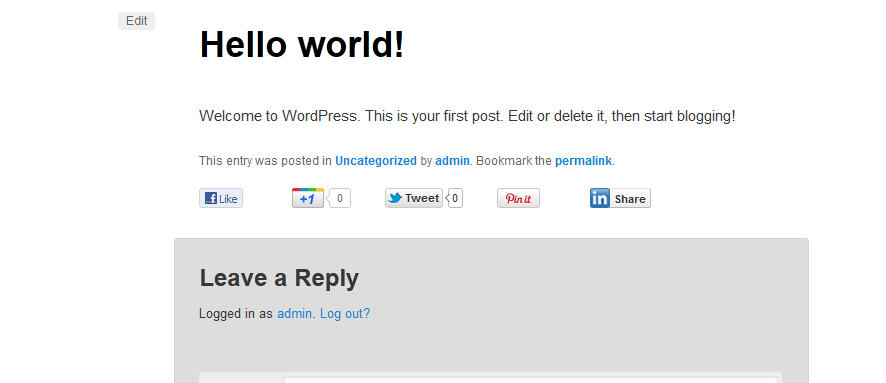
Show social icons at the top or bottom of post/page or adding the Facebook, Twitter, Pinterest, Google Plus and Linkedin buttons manually.
This plugin allows you to add the social share icons on your page and/or post. You can choose which social icons to show on the options page from a choice of FACEBOOK’s Facebook like/Facebook recommend, GOOGLE’s Google Plus, TWITTER’s Tweet this, PINTEREST’s pin this and LINKEDIN’s share on Linked in. Get your wordpress site found by the search engines by letting your readers share it with there social friends/followers – expose your site to more people will result in more viewers.
Track the social interaction with the social icons within your google anlaytics. To see which posts/pages are bring your site the most traffic
Now with Integration with Facebook insights to be able to track all inetegration with your website and Facebook click here to find out more
Features
- Choose to show automatically at the top and/or bottom of each post and or page or manually with the shortcode or template code
- You can add
<?php echo get_jamie_social_code(); ?>in template to show automatically on selected template - TinyMCE : Button integration for easy adding the social icons to specific posts/page/custom posts which addds shortcode
- Shortcode – manullay add shortcode to post
[jamiesocial] - Integration With Google Analytics
- Integration with Facebook Insights
- Ability to align the icons to the left, center or right
- Ability to add text before the icons
- In the process of creating ability to Localize the plugin
Future Updates/Work In Progress
- Ability to add automatically to CPT
- Add automatically to blog feed/excerpt page
- Add StumbleUpon
For more detailed instructions and any other requests click here
螢幕截圖
screenshot-1.png 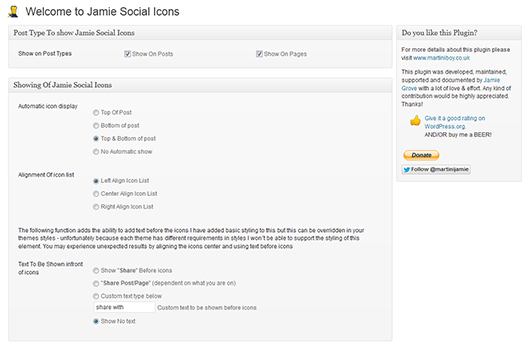
screenshot-2.png 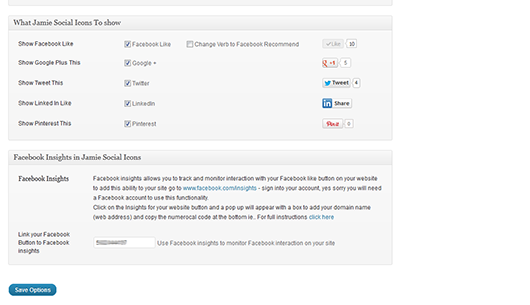
screenshot-3.png 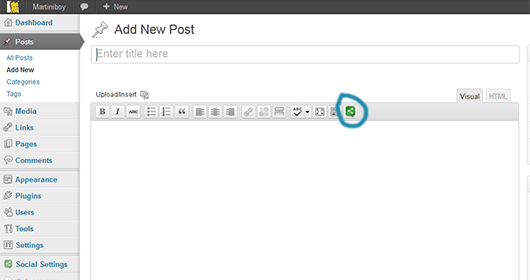
screenshot-4.png 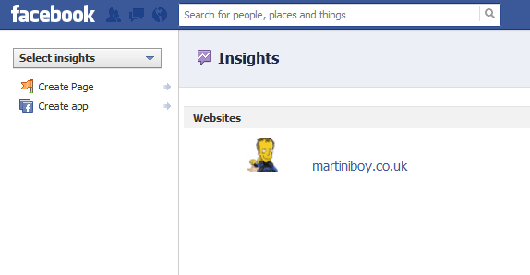
screenshot-5.png
安裝
- Upload
jamie-social-iconsfolder to the/wp-content/plugins/directory or one click install from dashboard - Activate the plugin through the ‘Plugins’ menu in WordPress
- Go to the Social Settings page and choose which icons that you would like to show
- You can choose to show the post automatically on the top and/or bottom of each post and/or page
- Or you can manually add shortcode to post by pasting
[jamiesocial]in or by simply clicking on the social icon button in the TinyMCE - Or for more control of precisely where you want the icons to show place
<?php echo get_jamie_social_code(); ?>in your template where you want the icons to show – Avoid if unsure of editing template files - If you want to overwrite styles – style ul.jamie_social in the surrounding container in your theme ‘s stylesheet
For more detailed instructions click here
常見問題
- When clicking on the pinterest no image is displayed in the pinterest popup.
-
Because the pinterest button is for images and on a page/post you can have multiple images this selects the featured image.
THIS HAS SINCE BEEN UPDATED AND ALLOWS YOU TO CHOOSE ANY IMAGE ON THE PAGE - How To show the Jamie Social Icons On the blog feed page/ excerpt news feeds
-
You can add the social icons after each post on the main blog feed/category pages although it will not be automatic.
You will need to add<?php echo get_jamie_social_code(); ?>into the template. On the index.php/category.php/archive.php look for the loop and after<?php the_excerpt();?>add the code and the icons will appear on the feed pages.
I did not make it a function so it is automatic because when you like/tweet etc a post it shares the url with posts on the blog feed/ category page the posts move to different pages if paginated as new posts are added.
If this function is required let me know And it will be in the next update - Facebook Icon is not showing
-
Recently Facebook has been doing lots of updates to their Facebook Like button which has resulted in the Facebook Button disappearing – especially in older browsers (IE8 and below), In update Version 0.9.2 it is now working with all browsers but will be keeping an eye on any updates.
- Google Plus Is not showing on my post
-
The Google Plus Button does not support IE7 so it will not be shown, if you are still using IE7 please update your browser to Google Chrome, Firefox or Safari or any other modern browser.
- Twitter is not displaying my counts
-
To improve performance Twitter cache the count before displaying it. The cache is updated frequently but on some occasions it may look like your count is not increasing while the cache is updated. In addition, the count only includes public Tweets meaning a Tweet from a protected account will not cause an increase.
- Can The Facebook Like change the Verb to Recommend?
-
This functionality has been added in the release of V0.9.6, you can show either Facebook Like or Facebook Recommend
- Twitter is showing as text, Facebook is not showing your plugin is broken!! LinkedIn & Google+ are not showing
-
Please check that your theme has wp_head in the header.php and wp_footer in the footer.php the plugin will not work without these important parts of code in the theme find out more here
- I cannot add the Social Icons automatically to CPT
-
I am currently working on this function and hope to have it available on a later release
- I have added default text infront of the icons and the style is not aligned next to the icons
-
Because each theme has unique stylesheets this is something I will not be able to support, you can override my plugins stylesheet in your themes stylesheet to get your desired effect. The ul list has a class of jamie_social
Any further questions click here or look through the support forum
評價
There are no reviews for this plugin.
貢獻者及開發者

修改日誌
V0.9.8.3 – 02.04.2013
- Bug Fix – incompatible with other plugins same function name
- changed Pinterest code to Pinterests Current code – still issue with using multiple PIN buttons only showing count on clicked one!!!
V0.9.8.2 V0.9.8.2 – 20.11.2012
- Bug Fix error in icons replacing content of posts
V0.9.8 – 18.11.2012
- Bug Fix with certain plugins icons showing at top of page as well
- Removed options page from main menu and put it under the settings menu as did not warrant the real estate
V0.9.7 – 08.10.2012
- Added Fallback options if default language hides Facebook button or want different language for Like Button
- Correct Code to show icons only at bottom of post
V0.9.6 – 07.10.2012
- Integration with Facebook Insights
- Ability to show icons at the top and bottom of post
- Ability to add custom and pre-made text before the icons
- Tidy up the settings page and file structure
- Beta Of localizing the code – to allow Facebook show in language of website
- Option of changing Facebook Like to Facebook recommend
V0.9.5 – 06.08.2012
- Structured call to js files
- Added functionality so you can track your social clicks within your google analytics account
V0.9.4 – 11.07.2012
V0.9.3 – 24.06.2012
- Bug Fixes
V0.9.2 – 23.05.2012
- Corrected Facebook like in IE8 and lower
- Removed empty li for Google Plus In IE7
- Add the Count on the Pinterest Button
- Updated Instructions
V0.8 – 07.05.2012
V0.9 – 07.05.2012
- Add ability to add social icons to top or bottom of post automatically
- BETA version to track social interactions within google analytics.
V0.7 – 08.04.2012
- Amends to styling
- Add choice of image for pinterest pin
V0.3 – 16.03.2012
Bug Fixes
V0.4 – 25.03.2012
V0.5 – 25.03.2012
V0.6 – 25.03.2012
- Fixed Facebook not showing in IE7
- Added Shortcode [jamiesocial] functionality
- Added Tiny MCE Button for shotcode
V0.2 – 14.03.2012
Error in attaching stylesheet – now corrected