
描述
Now its easier to include category / custom taxonomy image with this plugin for different platforms. No need to overload mobile bandwidth with high pixel image size. You can now select different image for different devices.
Documentation
$taxonomy_img = get_taxonomy_image( int $term_id = get_queried_object()->term_id , boolean $return_img_tag = false , array $class = array() );

get taxonomy image url if $return_html = true then return  tag

Parameters :
$term_id
(int) (Required) Taxonomy ID of the term.

$return_img_tag
(boolean) (Optional) Formatted Image with  tag for the field during output.

$class
(array) (Optional) Array of image classes ex: array('class1','class2',...) but $return_img_tag should be true to add image class.

echo $taxonomy_img; // taxonomy image url
where $term_id is ‘category / term id’
Shortcode : use the shortcode anywhere to get taxonomy image. If you don’t provide “term_id” value then it will be current queried page taxonomy automatically.
echo do_shortcode( '[ad_tax_image term_id="" return_img_tag="true" class="test-class"]' ); // keep term_id empty if you want to show current visited taxonomy archive image.
Features
- Option To Enable Custom Image Upload for different taxonomies
- Option To Enable Custom Image Upload for different devices
- Very simple to use & WP Default Media Uploaded to upload image
- Built-in Template Tag to use in your theme template
- Shortcode to use anywhere.
Interested in contributing to Drag & Drop Menu Items?
Contact me at sagorh672(at)gmail(dot)com
螢幕截圖

Settings page for enabling taxonomy image upload for different taxonomies 
Settings page for enabling taxonomy image upload for different devices 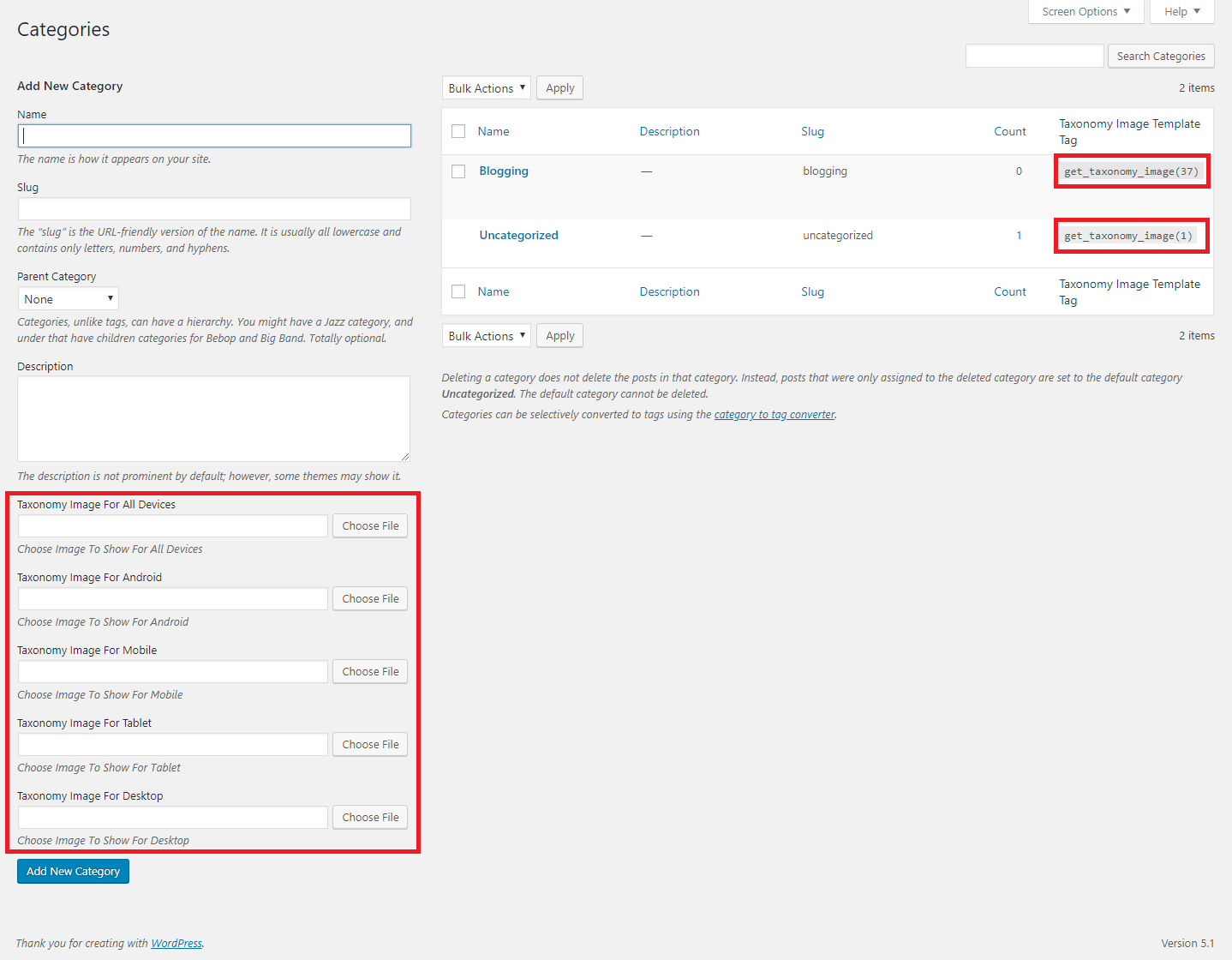
Auto Template Tag Generation
安裝
- Go to WordPress plugin page
- Click Add New & Upload Plugin
- Drag / Click upload the plugin zip file
- The resulting installation screen will list the installation as successful or note any problems during the install.
If successful, click Activate Plugin to activate it, or Return to Plugin Installer for further actions. - Go to your Dashboard ->Settings -> Advanced Category & Taxonomy Image.
- There You Will Find Fields To Enable Taxonomy & Device Filters.
- After Enabling Go To Your Taxonomy Add/Edit Page To Upload Image
常見問題
- How can i use the image i uploaded?
Get Your Taxonomy tag_ID and use get_taxonomy_image( $term_id ) to get the image url and use it in your theme’s template area where you want to show it. (Note : In the taxonomy list there you will find already created template tag to use see screenshot 3)
評價

2023年4月9日
tnx

2022年7月8日
I have used it. Works fine. Thank you for a useful plugin.

2021年1月30日
Really good plugin, the author responds quickly and is very friendly.

2020年7月5日
1 reply
I try to display taxonomy images on single post using <?php get_taxonomy_image(1455); ?>, but images don't show. How does slove this issue?

2019年9月6日
Excellent plugin for different images for each device.
貢獻者及開發者

修改日誌
1.0.8
- Added a new shortcode for dynamic usage in any template or dnd builder. Plus tested for latest wp compatibility..
1.0.7
- Minor Update.. tested for latest wp compatibility..
1.0.6
- Minor Update.. tested for latest wp compatibility.. added any device option and code style changed and beautified.
1.0.5
- Minor Update.. now tax template tag won’t be visible if no image is added
1.0.4
- Minor Update.. updated for tranlations ready..
1.0.3
- Minor Update.. tested for latest wp compatibility..
1.0.2
- Minor Update.. tested for latest wp compatibility..
1.0.1
- Minor Update.. tested for latest wp compatibility..
1.0
- Initial release.